



JsPCB自动布线
JsPCB自动布线
XH_Timmo133<a id="chinese"></a>
这是一个为嘉立创EDA专业版(EasyEDA)开发的自动布线扩展插件,集成了开源项目 JS-PCB 的布线引擎。
功能特性
- 一键布线:自动获取当前 PCB 的 DSN 数据进行布线。
- 参数配置:支持调整过孔代价、网格分辨率、采样次数等高级布线参数。
- 中英文界面:打开时跟随嘉立创EDA或浏览器语言,也可通过窗口右上角的语言按钮切换。
- 界面展示:蓝色主题、参数步进按钮、底部日志及关于弹窗;日志和历史记录随语言切换更新。
- 历史记录:自动保存布线历史,支持导出历史版本的 SES 文件。
- 布线控制:显示实时进度,支持停止和重新开始;超时或无法布通的网络会停止重试并保留可用结果。
- 导入方式:保留手动导入,可选择开启“完成后自动导入”(默认关闭);部分布通或超时结果需要确认。
- 规则兼容:修复 DSN 解析、间距、过孔尺寸和焊盘层处理,预览及布线支持多路径板框。
- 共享核心与无头调用:脚本或 Skill 可直接调用 dry-run 接口;Skill 规则为可选显式输入,普通布线不依赖 Skill。支持固定路径、禁布区、网络筛选和结构化报告。
使用方法
- 安装本扩展。
- 打开 PCB 文档。
- 点击顶部菜单:JSPCB - 自动布线
- 在弹出的窗口中配置布线参数(或保持默认)。
- 点击 开始布线。
- 等待布线完成,点击 导入 SES。
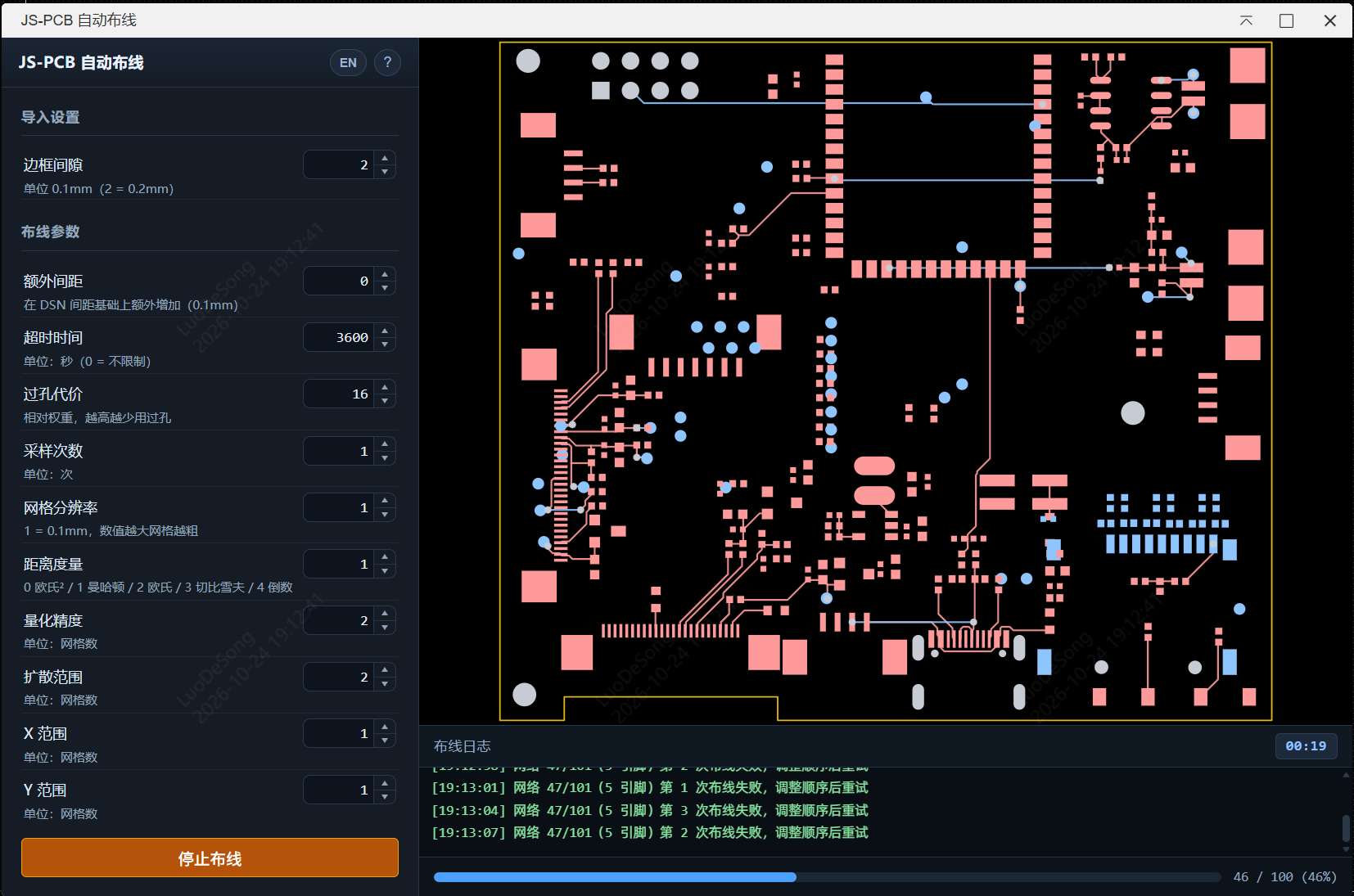
无头布线与 Skill 调用
启动后可调用 external.jspcb.getCapabilities() 和 external.jspcb.routeCurrentPcb(options),无需先打开布线窗口。省略 rules 即按 DSN 规则布线;固定铜和禁布区也不依赖 Skill。首版仅支持 dry-run,未实现的必选约束会明确拒绝,无头导入保持禁用。
接口、坐标单位、能力边界、报告及普通/Skill 调用示例见 无头 API 文档。原有 UI 的历史记录、手动获取/导入/导出和默认关闭的自动导入保持可用。
已知局限性与贡献说明
由于 JS-PCB 引擎本身的算法特性限制,当前的自动布线效果可能较为一般,特别是对于元件密度较高或规则复杂的 PCB,可能会出现:
- 布通率较低,无法完成所有网络的连接。
- 走线路径不够优化,存在绕线或冗余过孔。
- 网格布线难以完整表达所有复杂设计规则,导入后仍需检查连接与 DRC。
- 超时按每次采样计算,默认 3600 秒,0 表示不限制。
本项目的主要目的是提供一个将自动布线器集成到 EasyEDA 的技术框架与参考实现。
我们非常欢迎社区开发者参与进来,基于此框架:
- 优化现有的布线参数配置逻辑。
- 改进底层布线算法。
- 引入或移植其他更强大的开源布线引擎。
希望能通过社区的力量,共同打造一个好用的开源自动布线扩展!
贡献来源
本次多语言与界面展示改进部分提取并改编自 PR #1,感谢原贡献者 @easyeda2021。保留历史记录与手动导入/导出流程;详细来源及第三方版权声明见 NOTICE.md,本次 PR 描述草稿见 docs/pr-1-ui-backport.md。
后续通过 PR #3 整合 @easyeda2021 的 DSN、布线、焊盘层和过孔修复,同时保留主线的历史记录、手动操作、双语界面与署名。完整来源见 NOTICE.md。
开发验证
npm ci
npm run typecheck
npm test
node iframe/jspcb/test_runner.js
npm run build
npm test 统一运行 UI、路由和无头测试;也可分别使用 test:ui、test:routing、test:headless。它们验证语言加载与界面兼容逻辑、实际布线引擎和 DSN→SES 转换,以及无 Skill 调用、固定铜与约束、目标选择和文件输出。npm run test:watch 监听变更并重跑测试,npm run test:coverage 输出 Node 原生覆盖率报告。命令行测试默认读取 tests/fixtures/ 下的样例,也支持传入 DSN 路径;构建成功不代表已完成真实 PCB 的布线或 DRC 验证。
第三方开源组件说明
本项目在自动布线功能中移植并使用了以下第三方开源项目代码:
- JS-PCB (https://github.com/vygr/JS-PCB)
- 许可证:GNU General Public License v2.0 (GPL-2.0)
- 原始引擎移植代码位置:
src/core/engine/(router.js、mymath.js、layer.js等);iframe/jspcb/worker.js负责 Worker 消息适配。 - 修改说明:
iframe/jspcb/index.html: 修改了 UI 布局和样式以适配 EDA 扩展风格。iframe/jspcb/main.js: 增加了与 JLCEDA API 通信的胶水代码(DSN 获取与 SES 导入)。- 修复了在 IFrame 环境下 Worker 加载的跨域/安全问题。
注意:本扩展包遵循 GPL-2.0 协议分发,许可证全文见 LICENSE。SDK 模板原有的 Apache-2.0 许可证与 JLCEDA 版权声明保留于 LICENSES/Apache-2.0.txt。如果您分发本扩展包或其衍生作品,请确保遵守相应许可证条款。
<a id="english"></a>
JS-PCB Autorouter for EasyEDA
An automatic PCB routing extension for EasyEDA (嘉立创EDA专业版), powered by the open-source JS-PCB engine.
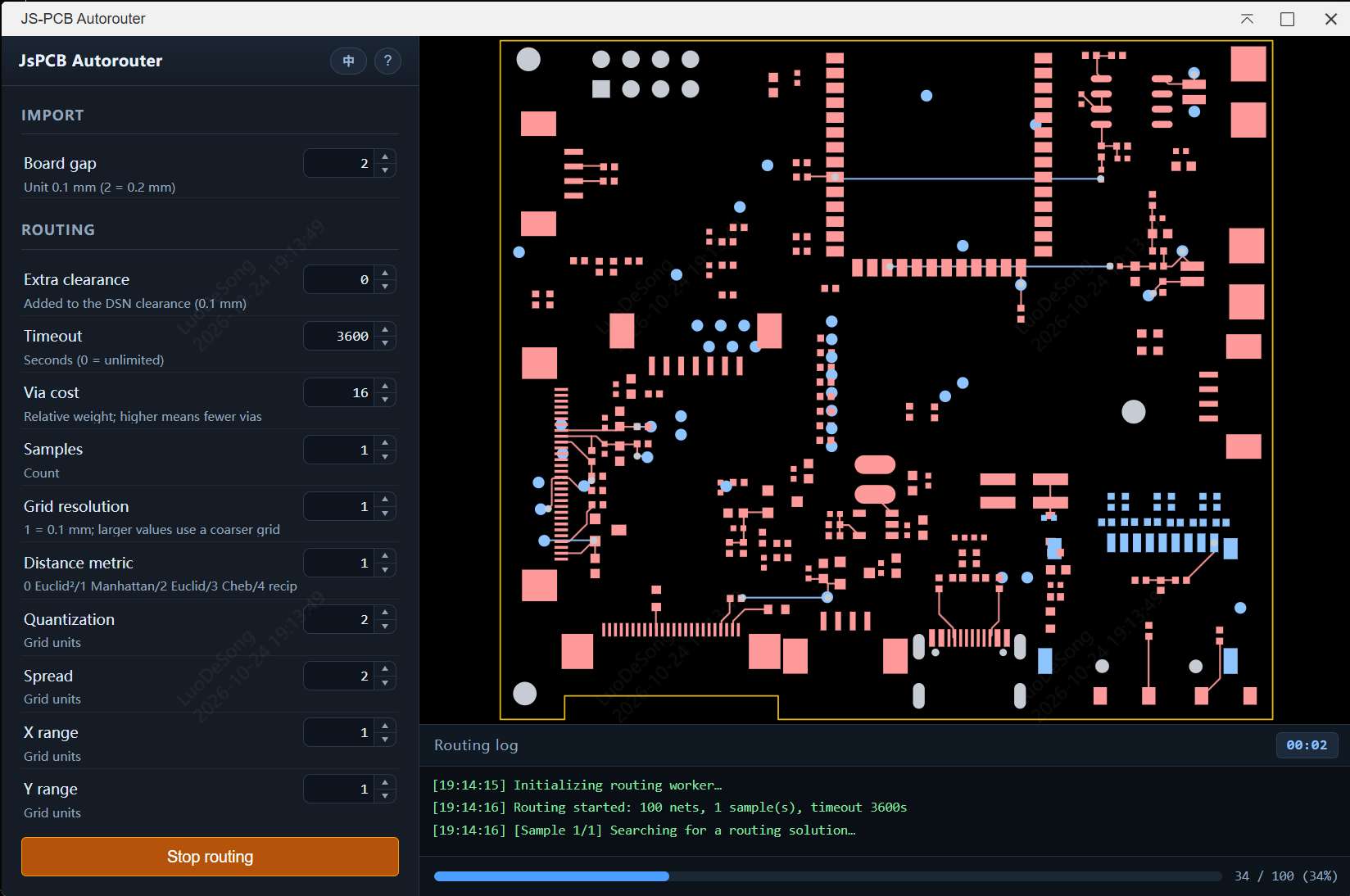
Features
- Automatic DSN loading: fetches the current PCB's DSN when the dialog opens and previews its board outline and pads. The DSN button also lets you load the board again.
- Live preview: updates pads and traces during routing, with colors for different copper layers.
- Board outlines: displays multiple DSN boundary paths, including cut-outs, and uses their edges as routing constraints.
- Start and stop: stop the active routing task and start another run.
- Routing controls: configure timeout, samples, grid resolution, via cost, distance metric and clearance.
- Progress and logs: shows the routed-net count and timestamped logs below the preview.
- Manual and optional automatic import: import or export SES using the button. Automatic import is off by default; when enabled, fully routed results can be imported automatically. Partial or timed-out results require confirmation.
- Routing history: keeps the latest 10 results and their parameters, with SES downloads.
- Chinese and English: follows the EDA or browser language initially, with a language switch beside the help button. Existing logs and history labels update when the language changes.
- Shared core and headless API: scripts and Skills can call the router directly for dry-runs, with explicit optional constraints, protected copper, keepouts, net selection and structured reports. No Skill installation is required.
Requirements
- EasyEDA with extension support, matching
engines.eda: ^3.2.0. - An open PCB for the UI workflow, or an open project and explicit PCB/board target for headless calls.
- Node.js 20.5 or newer to build the extension.
Build and Installation
npm ci
npm run build
Install the generated .eext package from build/dist/ using Extensions → Install from file in EasyEDA, then open a PCB document.
Usage
- Open a PCB document in EasyEDA.
- Choose JsPCB Autorouter in the PCB menu.
- Wait for the DSN to load and the board preview to appear. Use the DSN button to fetch it again if needed.
- Adjust the routing parameters.
- Click Start routing. The button changes to Stop routing while the task is running.
- After routing finishes, click Import SES to apply the result. If you enable automatic import, fully routed results are imported automatically; partial or timed-out results still ask for confirmation.
- Download previous SES results from History when needed.
In a browser environment, the interface accepts a DSN file and downloads the generated SES instead of importing it into EasyEDA.
Headless Routing and Skill Integration
Startup registers external.jspcb.getCapabilities() and external.jspcb.routeCurrentPcb(options) without opening an IFrame. Omitting rules uses DSN rules; Skill constraints are explicit optional inputs. Protected routes and keepouts can also be used by ordinary callers. This release supports dry-run only and rejects unsupported mandatory constraints and headless import.
See the headless API documentation for examples, coordinates, reports and capability limits. Existing history, manual DSN/SES workflows and opt-in UI automatic import remain available.
Parameters
| Parameter | Unit / range | Description |
|---|---|---|
| Timeout | Seconds, 0–10000, default 3600 | Maximum time per sample. 0 means no limit. On timeout, the best result found so far is retained. |
| Board gap | 0.1 mm, 1–5, default 2 | Margin around the board in the routing grid; this is separate from electrical clearance. |
| Extra clearance | 0.1 mm, 0–20, default 0 | Additional margin applied on top of the DSN clearance. |
| Via cost | Relative weight, 0–256, default 16 | Higher values discourage vias. |
| Samples | Count, 1–32, default 1 | Number of routing attempts; the best result is selected. |
| Grid resolution | 1–4, default 1 | Resolution multiplier. Higher values produce a finer grid. |
| Distance metric | 0–4, default 1 | 0 squared Euclidean, 1 Manhattan, 2 Euclidean, 3 Chebyshev, 4 reciprocal. |
| Quantization | Grid units, 0–64, default 2 | Coordinate quantization used by the routing heuristic. |
| Spread | Grid units, 0–5, default 2 | Flood-fill search range. |
| X / Y range | Grid units, 0–5, default 1 | Layer-specific horizontal and vertical search ranges. |
Clearance and Board Constraints
Electrical clearance comes from the DSN: each net uses its class rules, with the structure's rules used as defaults. Padstacks inherit the default clearance. Extra clearance adds a global margin on top of those values.
The board boundary is added as an obstacle on each copper layer. The router uses each pad's actual copper layers and layer-specific geometry for connectivity and collision checks. Via definitions are retained from the DSN, and each SES via padstack is declared once.
The Board gap parameter controls the routing-grid margin. It does not replace the DSN electrical clearance rules.
Known Limitations and Contributions
JS-PCB is a relatively simple routing engine. Dense boards or complex rules may lead to incomplete routing, detours or unnecessary vias. Nets that fail after repeated attempts are skipped so that other nets can finish, and timeout applies separately to each sample.
Rules and keepout regions that are not represented by supported DSN data may not be enforced. Imported results still need connectivity checks and DRC in EasyEDA. The included regression fixtures and browser checks do not replace verification in the actual EDA client.
This project provides a framework and reference implementation for integrating an autorouter into EasyEDA. Contributions to routing parameters, algorithms and alternative routing engines are welcome.
Contribution Sources
The bilingual interface and presentation improvements were partially adapted from PR #1 by @easyeda2021. These changes were integrated through PR #2, preserving routing history and manual SES import/export.
PR #3 integrated further DSN parsing, routing, pad-layer and via fixes from the same contributor. The integration preserves the bilingual interface, attribution, history and manual controls, and makes automatic import optional. See NOTICE.md for source commits and third-party attribution.
Development and Validation
npm ci
npm run typecheck
npm test
node iframe/jspcb/test_runner.js
npm run build
npm testruns all UI, routing and headless tests. Each group can also be run separately.test:uichecks language loading, task state, stale-worker handling and import policy.test:routingchecks the actual routing engine and DSN-to-SES conversion.test:headlesschecks ordinary calls without Skill, fixed copper, constraints, target selection and artifact output.test:watchreruns tests on changes;test:coverageprints Node's native coverage report.- The CLI runner uses the bundled DSN files in
tests/fixtures/by default and also accepts explicit DSN paths.
A successful build does not establish that a real PCB passes routing or DRC validation. See CHANGELOG.md for changes.
License and Third-Party Components
The extension is distributed under the GNU General Public License v2.0 (GPL-2.0). See LICENSE for the complete text.
- JS-PCB (vygr/JS-PCB): GPL-2.0. The ported engine is in
src/core/engine/, includingrouter.js,mymath.jsandlayer.js.iframe/jspcb/worker.jsnow adapts Worker messages to the shared solver. iframe/jspcb/main.jsprovides DSN fetching, SES import and UI integration with EasyEDA.src/core/engine/dsn-normalizer.jsnormalizes DSN coordinates, units and layer names.- The iframe interface and Worker-loading integration have been adapted for the extension environment.
The original SDK template's Apache-2.0 license and JLCEDA copyright notice are retained in LICENSES/Apache-2.0.txt. Existing third-party notices and contributor attribution remain applicable; see NOTICE.md.
更新日志
[1.6.1] - 2026-10-29
-
修复 Issue #6:无头转角检查按同网同层中心线交点建图,检出线段内部 T 接入和交叉;重叠、重复及反向边合并同向射线,保证等价拆段不改变直角计数和规则验收。补充交点回归及中英文检查语义,不改写原始铜或 SES。
-
删除引用缺失
src/autorouter/实现的旧 Jest 测试、配置及专用依赖;npm test统一运行现有 UI、路由和无头回归,监听与覆盖率脚本改用 Node 原生测试。 -
抽取
src/core/共享纯核心,UI Worker 与独立无头入口使用同一求解器;普通调用不依赖 Skill,额外规则由调用方显式传入。 -
启动时注册
external.jspcb.getCapabilities和routeCurrentPcb,支持目标选择、dry-run 报告和可选 SES/JSON 文件输出;首版禁用无头导入。 -
固定路径与生成路径分离:同网可连接、异网避让,重试和多次采样保留原始固定铜;修复
add_track忽略输入路径,网络名贯穿 DSN、核心和 SES。 -
增加多边形禁布区、网络筛选/优先级、显式铜距/板边间距和结果几何检查,覆盖率按实际铜与焊盘接触关系计算。
-
对尚未实现的焊盘出线、倒角/圆弧、过孔与丝印/测试点距离及既有布线自动采集明确拒绝;未测量的指标返回
null,不宣称完整符合某个 Skill 版本。 -
补入固定线路交叉样例、核心/无头适配测试、生产源类型检查及中英文接口文档;扩展 UUID、包名和普通界面手动操作保持不变。
[1.6.0] - 2026-10-24
以 v1.5.0 为基线,重点修复 DSN 解析、布线卡死和焊盘层错误,并重做界面交互。
主线整合(2026-10-28)
- 合并 PR #3,并解决与已合并 PR #2 的界面、文档和多语言冲突;保留原作者(@easyeda2021)署名与提交历史。
- 保留主线的历史记录、手动获取 DSN、手动导入/导出及扩展包名称;自动导入作为默认关闭的选项。
- 任务创建失败和结果确认回调均校验任务标识,避免旧任务影响新结果;SES 使用该次布线冻结的文件和参数生成。
- 补入三引脚、跨层 SMD 和带挖槽板框的 DSN 样例,以及节点编码、焊盘分层、超时和最佳结果统计回归。
- CLI 检查考虑通孔焊盘的跨层连接,失败时返回非零退出码。
修复
- DSN 解析错位:解析器现在把
(也作为分隔符,支持嘉立创导出的(rule(clear 6.05))、(boundary(path ...))等无空格写法;此前会导致整棵语法树错位,library/network被吞掉,DSN 解析失败。 - Worker 异常静默退出:worker 内部异常会回传给主线程并恢复“开始布线”按钮, 不再出现窗口一直停在初始化状态的情况。
- 超时不生效:
route(timeout)的超时检测原先被注释掉,复杂板会无限计算。 现在按秒真正超时,并保留当前已布通的最佳结果。 - 无限重排:某个网络连续重试 4 次仍无法布通时跳过,避免整块板永远卡在重排循环里。
- 代价计算错误:未布通网络现在会施加极大的代价惩罚,避免“一条线都没布”的结果 因为总长度最小而被当成最优解。
- 焊盘层错误(导线在底层却没有过孔):原实现忽略了 padstack 的层信息,把所有焊盘 当成通孔处理,布线器可以直接从顶层 SMD 焊盘在底层出线。现在每个焊盘按实际层参与 起点/终点和碰撞检测,换层时必定生成过孔。
- 过孔尺寸不一致:改用 DSN 中真实的过孔 padstack 尺寸(本板 24 mil), 与导出的 SES 保持一致。
- 布线间距被减半:解析 DSN clearance 时误用了半径公式(除以 2), 导致实际间距只有设计值的一半,导入后出现大量 DRC 报错;现在使用完整间距。
- 板边缺少约束:板框现在作为墙壁参与碰撞,走线/过孔会与板边保持间距, 避免贴边或越界。
- class 网络名丢失:转换时把 class 中的网络名写回,修正网络 → 线宽/间距映射。
- 单层焊盘碰撞计算:修复零长度线段法向量为 NaN 的问题。
- DSN 缺字段容错:缺少 class / component / pin / padstack 时不再抛异常。
- 节点 Key 碰撞风险:NodeSet 改为基于板子尺寸的数值 key,并做范围/整数校验;越界坐标退化为字符串 key,避免固定基数编码碰撞。
- 最佳结果统计不一致:worker 的
unrouted/total改为从最终best_pcb统计,保证界面数字与实际导出结果一致。 - 多层焊盘几何丢失:padstack 按层保存实际形状/尺寸,障碍物判断和间距计算使用对应层几何。
- 未知焊盘层:缺少层信息时不再默认所有层可连接;该网络会失败并记录日志,碰撞仍保守阻挡。
- 过孔定义不一致:归一化时保留原始
via0与 class 的use_via,移除写死的 via padstack。 - SES 重复声明 via0:每种过孔 padstack 只声明一次。
- 超时无法中断长搜索:洪水填充和回溯路径加入周期性超时检查。
- 快速停止/重启竞态:增加 generation 令牌,过期 Worker 不会覆盖新任务。
- 进度条不到 100%:布线进程结束后进度条置满,同时文字显示实际布通数量。
- test_runner 旧协议:适配
{type:'done', data},增加 via0 唯一性、多引脚连通性和 SES 坐标回归检查。
新增
- 打开即自动载入 DSN:窗口打开后等待 EDA API 注入并自动获取当前 PCB 的 DSN, 失败时自动重试 5 次;非 EDA 环境回退为文件选择。
- 布线完成后自动导入:可通过开关启用(默认关闭);完全布通时生成 SES 并导入当前 PCB;保留手动导入按钮。 导入失败时回退为保存文件(浏览器环境为下载)。
- 动态布线预览:布线过程中约每 250ms 回传一次当前 PCB 快照,实时看到走线增加。
- 打开即预览:DSN 载入后立即绘制板框与焊盘,不必等到开始布线。
- 焊盘分层预览:顶层焊盘/走线淡红色、底层焊盘/走线淡蓝色、通孔焊盘淡灰色。
- 额外间距参数:在 DSN 间距基础上统一增加间距(单位 0.1 mm)。
- 板框预览:预览中以黄色线条绘制 DSN 板框(含凹槽/异形边)。
- 关于弹窗:顶部新增
?图标,点击显示版本、来源与功能说明。 - 日志面板:布线日志改为预览区底部的面板,高度为右侧区域的 1/5(700px 窗口下约 140px);日志带时间戳,记录采样、失败重试、超时、导入等详细工作内容。
- 进度条:日志底部新增布线进度条,显示已布通数量与百分比。
- 停止/重新开始:开始布线后按钮切换为“停止布线”,点击可立即终止;停止后可再次开始。
- 多语言:界面与菜单支持中/英文,打开时自动跟随 EDA 语言;问号图标左侧新增语言切换按钮。
- 部分结果确认:部分布通/超时结果不再自动导入,弹窗由用户选择“导入结果”或“取消”。
- 多路径板框:boundary 按 path 分别保存,支持凹形外框和内部挖槽/开孔。
变更
- 左侧参数区重新布局:参数改为单列行式布局并保留各项说明,填满侧栏,1100×700 下无竖向滚动条。
- 参数说明补充单位(秒、0.1mm、网格数、次数等)。
- 默认超时时间调整为 3600 秒。
- 数字输入框重绘:隐藏原生上下箭头,改为输入框内部的上下步进按钮。
- 计时器从预览区右上角移到“布线日志”标题右侧。
- DSN 载入、布线完成等状态改用吐司提示,移除侧栏内的状态文案。
- 整体配色调整为更明亮的蓝调主题,提高文字与控件对比度。
- 预览中的导线按层着色:顶层淡红色、底层淡蓝色。
- 更换logo。
与主线兼容
- 保留“从 EDA 获取 DSN”按钮,并在 EDA 环境打开时自动获取。
- 保留“导入 SES / 导出 SES”按钮,按需启用自动导入。
- 保留历史记录及原有 localStorage 数据。
- 侧栏底部版本/来源文案移入
?关于弹窗。
许可证
- 许可证由 Apache-2.0 调整为 GPL-2.0,更新
LICENSE与package.json。
重命名
iframe/jspcb/jlc2kicad.js→iframe/jspcb/dsn-normalizer.jsconvertJlcToKicad()→normalizeDsn()isJlcConverted→isDsnNormalized
[1.5.0] - 初始公开版本
仓库首个提交(bf78710)对应的版本。
功能
- 基于 JS-PCB 的自动布线引擎,运行在 Web Worker 中。
- 在嘉立创EDA专业版 PCB 菜单中打开布线窗口。
- 从 EDA 获取 DSN、参数配置、执行布线。
- 布线历史记录与历史 SES 下载。
- 手动“导入 SES”按钮。
- 嘉立创 DSN 到 JS-PCB 所需坐标系/层名的转换(当时的
jlc2kicad.js)。 - 修复 iframe 环境下 Worker 的跨域/加载问题。
已知限制
- 布通率一般,高密度板可能大量网络无法布通。
- 布线速度较慢,复杂板可能长时间没有结果。
- 焊盘未区分层,可能出现导线层与实际焊盘不符。
说明:v1.5.0 之前本仓库没有保留版本标签或历史提交,无法可靠还原更早版本的具体变更, 因此未在此列出,避免虚构。

类型
关键词
扩展信息
| 版本 | v1.6.1 |
| 发布者 | JS-PCB |
| 发布时间 | 2026-10-29 17:48:41 |
| 名称 | auto-routing-with-jspcb |
| UUID | fe81c92e8cae445f9e4e4117058555f5 |
| 适用EDA版本: | ^3.2.0 |
| 报告 | 报告滥用 |
评论