



DeepPCB AI Autorouter
DeepPCB AI Autorouter
OSHWHub6使用 DeepPCB 云端 AI 引擎,在 嘉立创EDA专业版 / EasyEDA Pro 的 PCB 编辑器中一键自动布线。
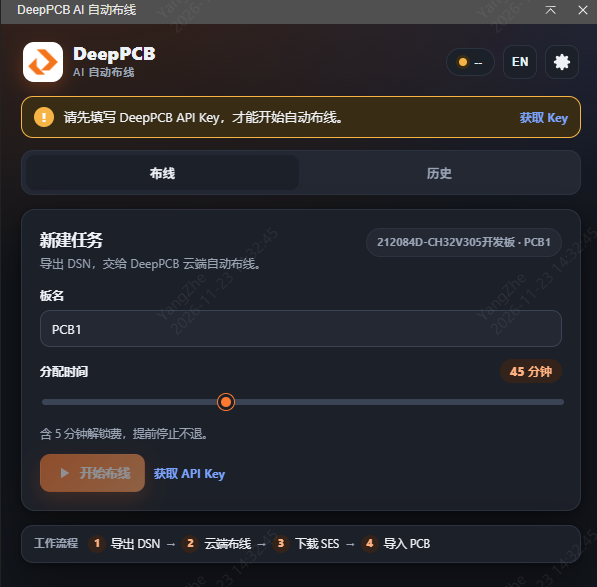
本扩展是开源项目 deeppcb-kicad-plugin 的 EasyEDA Pro 移植版。非官方社区项目,与 InstaDeep / DeepPCB 官方无隶属关系;DeepPCB 名称与 Logo 归 InstaDeep Ltd. 所有。
功能
- 一键 AI 布线:把当前 PCB 导出为 Specctra DSN,交给 DeepPCB 云端引擎生成布线方案。
- 自动回传:下载 SES 布线结果并直接导入当前 PCB,不需要手动转换文件。
- 额度显示:启动前检查余额,运行中显示费用,结束后刷新额度。
- 任务管理:开始、停止、继续、新建任务;保留历史方案,可导入最新或指定方案。
- 板子规模检查:开始前检查,超过 8 层、1,200 飞线、1,000 器件或 2,200 引脚时用吐司提示并阻止继续。
- 会话恢复:重新打开窗口后可恢复上次任务。
- 评分反馈:任务完成后可评价速度、DRC 和方案质量。
- 中英双语:跟随系统语言,可随时切换;支持浅色 / 深色主题。
安装
- 下载最新构建的
deeppcb-autorouter_v*.eext(版本号见文件名 / Releases)。 - 打开 EasyEDA Pro → 设置 / 高级 → 扩展 → 从文件安装。
- 选择
.eext文件并启用扩展。 - 首次使用时,在扩展设置中允许 外部交互 / 外部网络请求。
快速开始
- 打开一个包含 PCB 的工程,切换到 PCB 编辑器。
- 顶部菜单选择 PCB → DeepPCB AI Autorouter → Open DeepPCB。
- 首次打开会自动弹出设置:
- 填入 DeepPCB API Key;
- 点击 测试连接,确认能读到额度;
- 点击 保存。
- 在“新建任务”中确认板名和分配时间(5–120 分钟,默认 45 分钟)。
- 点击 开始布线,等待 DeepPCB 云端完成。
- 布线完成后,新方案会自动下载并导入当前 PCB;也可以手动点击 导入最新方案。
- 可用 保存 .ses 导出方案文件,或 在 DeepPCB 中打开 查看网页端详情。
任务运行期间请勿修改 PCB。如需修改,请先点击 停止。提前停止会保留 5 分钟解锁费用。
第一次使用:API Key 与额度
1. 注册并生成 API Key
- 注册 DeepPCB:app.deeppcb.ai
- 生成 API Key:app.deeppcb.ai/integration
2. 自行充值额度
DeepPCB 是付费服务,额度需要你在自己的 DeepPCB 账户中充值。 本扩展不提供额度、代充或共享账号。
- 费用估算:
creditsCostPerMinute × 分配时间 - 包含 5 分钟解锁费用,提前停止不退还该部分
- 充值入口:app.deeppcb.ai/time-balance
扩展只会读取并显示余额,不处理支付。具体价格、免费额度和促销以 DeepPCB 官方为准。
连接失败 / 提示 CORS 时
扩展会直接调用 DeepPCB API(默认 https://api.deeppcb.ai/api/v1)。如果请求被拦截或无法访问,请检查网络连接和设置中的 API 地址;DeepPCB 需要允许 EasyEDA 来源访问,若你的网络无法访问该接口,请联系 DeepPCB。
常见问题
测试连接提示 401 / 403 API Key 无效或过期。请到 app.deeppcb.ai/integration 重新生成,并在设置中保存。
额度不足
按 creditsCostPerMinute × 分配时间 估算费用。请到 app.deeppcb.ai/time-balance 充值,或减少分配时间。
提示 CORS / Failed to fetch 检查网络连接和设置中的 API 地址;DeepPCB 需要允许 EasyEDA 来源访问。
打不开窗口 / 提示“未检测到 EasyEDA API”
- 请从 PCB 编辑器 的菜单打开,而不是在浏览器中直接打开 HTML。
- 关闭窗口后重新从菜单打开;必要时重启 EasyEDA Pro。
- 确认扩展已启用,并允许外部交互。
导入失败
- 确认当前打开的是上传时对应的 PCB。
- 可用 保存 .ses 导出方案,再通过 PCB 编辑器的自动布线导入功能手动导入。
- 需要 EasyEDA Pro 引擎
>= 3.2.0。
任务一直处于 Pending DeepPCB 解析 DSN 可能需要数十秒,面板会自动刷新。若长时间无变化,请在 DeepPCB 网页端查看任务详情。
设置项
| 设置 | 默认值 | 说明 |
|---|---|---|
| API Key | 空 | DeepPCB 个人 API Key |
| API 地址 | https://api.deeppcb.ai/api/v1 | 使用私有网关时可修改 |
| 默认分配时间 | 45 分钟 | 新建任务时的初始时长 |
| 自动导入新方案 | 开启 | 新方案到达时自动写回当前 PCB |
API Key 仅保存在本机扩展配置中;请求只会发送给你在设置中配置的 API 地址。
菜单
| 菜单项 | 说明 |
|---|---|
| Open DeepPCB | 打开 DeepPCB 面板 |
| New Job... | 打开面板并聚焦新建任务 |
| Settings... | 打开 API Key / 网络 / 默认时间设置 |
工作原理
- 扩展把当前 PCB 导出为 Specctra DSN 并上传到 DeepPCB。
- DeepPCB 云端 AI 在分配时间内生成布线方案。
- 扩展下载 SES 结果并导入当前 PCB。
从源码构建
npm install
npm run build
构建产物位于 build/dist/deeppcb-autorouter_v<版本号>.eext。
版本号从 0.0.1 开始,每次 npm run build 自动 +1;每 30 次进 1 位(0.0.30 → 0.1.0)。
GitHub Actions 会在 main 上的主版本号或次版本号变化时自动打包并发布 .eext;推送 v0.1.0 这类 tag,或手动运行工作流,也会发布 release。
致谢与许可
- 参考项目:instadeepai/deeppcb-kicad-plugin,Copyright 2026 InstaDeep Ltd.,Apache-2.0。
- DeepPCB 名称与 Logo 归 InstaDeep Ltd. 所有;Logo 取自上游仓库。
- 本项目以 Apache-2.0 许可发布,详见 LICENSE 与 NOTICE。
Changelog
All notable changes to this project are documented in this file.
The format is based on Keep a Changelog, and this project adheres to Semantic Versioning.
0.0.7 - 2026-11-06
Added
- Pre-flight board limit check before routing: 8 copper layers, 1,200 airwires, 1,000 components and 2,200 pins. Boards above any limit are blocked with a toast showing the actual and allowed values.
- GitHub Actions release workflow: packages and publishes the extension when the major or minor version changes, or when a
v*tag is pushed.
0.0.6 - 2026-11-06
Changed
- Shorten the new-job card copy and the menu label to New Job... / 新建任务....
- Default new tasks to the PCB name; reopening New Job... resets a stale task name to the current PCB.
0.0.5 - 2026-11-06
Changed
- Remove the auto-import checkbox from the new-routing-job card; the option remains in Settings.
- Remove the "previous run" card from the top of the dashboard. Use Restore previous run next to Start routing instead.
- Size the dashboard to its content (600 × 510, or 600 × 565 before an API key is configured) so the empty strip at the bottom is gone.
0.0.4 - 2026-11-06
Changed
- Reduce the dashboard to 600 × 720 so it covers less of the PCB canvas.
- Replace the four-step workflow card with a single horizontal business axis.
- Compact the settings dialog: API key, API URL + Test connection inline, allocated time and auto-import side by side, shorter hints.
0.0.3 - 2026-11-06
Fixed
- Clear existing tracks and vias before importing a new SES solution, so solutions no longer stack on the canvas.
- Import a new solution directly (clear + import) without a confirmation dialog.
- Do not open the rating dialog automatically after a job; the user opens it from the Rate button.
- Default the board name to the PCB name instead of the project name.
- Use the edited board name for the uploaded DSN filename.
- Reduce the dashboard width to 720 px so it covers less of the canvas.
- Move Test connection directly below the API base URL field.
- Reduce the empty space at the bottom of the routing progress dialog.
Changed
- Removed the external bridge / CORS proxy settings; the extension uses the DeepPCB API directly.
- README: English version first with a link to Chinese; removed the proxy package instructions.
0.0.1 - 2026-11-05
Added
- DeepPCB AI autorouting for EasyEDA Pro PCB editor.
- Header menu under PCB → DeepPCB AI Autorouter: Open, New Routing Job, Settings.
- Specctra DSN export via
pcb_ManufactureData.getDsnFile(). - DeepPCB board creation with the
dsnFilemultipart field (no.eproproject upload). - Board creation sends the
webhookUrl/webhookTokenfields required by DeepPCB's API-key validation. - Job lifecycle: create, wait for board readiness, credit check, submit, poll status, stop, resume, new job.
- Specctra SES (
.ses) download and import viapcb_Document.importAutoRouteSesFile(). - Automatic import of new solutions (configurable), plus manual import of the latest or a selected revision.
- Save the selected solution as a local
.sesfile. - Live credit balance, cost-per-minute display, remaining-time calculation and insufficient-credit dialog.
- Per-project session restore and a recent-run history stored in extension user configuration.
- Board rating dialog (speed, DRC, solution quality, feedback).
- Settings dialog: API key, API base URL, default allocated time, auto-import toggle, connection test.
- Bundled local proxy package (
tools/deeppcb-proxy.zip) with double-click launchers for Windows/macOS/Linux; the launcher detects Node.js and downloads a verified portable copy into the current folder when needed. - In-app Download proxy package and Use local proxy helpers; DeepPCB currently only allows browser requests from
app.deeppcb.ai. - Automatic versioning: starts at
0.0.1, increments on every build, and advances the minor after 30 patches (0.0.30→0.1.0). - Bilingual UI (Simplified Chinese / English), light and dark themes.
- Extension metadata and menu translations for
enandzh-Hans. - Language switching now re-renders in place (no iframe reload), preserving the API key and open dialogs.
- Settings modal keeps its header/close button and footer actions fixed while the body scrolls.
- Dashboard opens a fresh iframe each time, avoiding a stale/blank frame after upgrading the extension.
- Removed the footer branding line.
- Removed the About dialog and menu entry.
- README rewritten for end users; the local Node proxy is the only documented relay.
- README: notes that DeepPCB credits are user-funded and must be topped up by the user.
- README, NOTICE and upstream attribution; DeepPCB logo taken from the reference repository.
Notes
- Unofficial community port of deeppcb-kicad-plugin (Apache-2.0).
- Requires EasyEDA Pro engine
>= 3.2.0forimportAutoRouteSesFile(). - External network interaction must be allowed for the extension in EasyEDA settings.

类型
关键词
扩展信息
| 版本 | v0.0.8 |
| 发布者 | EasyEDA |
| 发布时间 | 2026-11-23 14:45:40 |
| 名称 | deeppcb-autorouter |
| UUID | 323f151f184b30e619e478cf1a10a275 |
| 适用EDA版本: | ^3.2.0 |
| 报告 | 报告滥用 |
评论